
AI Drawing Style Guide: Perfect Art Styles in 60 Seconds
Have you ever spent minutes, or even hours, trying different AI styles on your photo, only to get disappointing results? You're not alone. The biggest challenge in AI art often isn't the technology—it's knowing which style works best with your specific image. This guesswork can be frustrating and time-consuming.
This visual cheat sheet is designed to eliminate that problem. We'll pair common photo types with their perfect styles on AIDrawing.io. You'll also learn how to choose the ideal aspect ratio to make your art pop. With this guide, you can stop guessing and start creating stunning, shareable AI drawing art in under a minute. Ready to transform your images effortlessly? You can try our free tool right now.
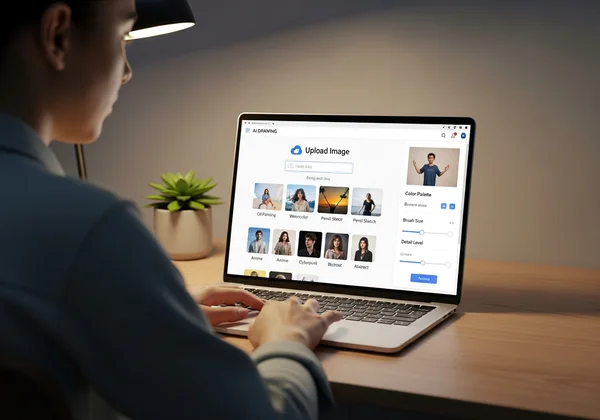
Photo Type to Style Pairings: The Ultimate Visual Guide
Finding the right style is the key to creating breathtaking AI art. Not every style fits every photo. A style that makes a landscape look magical might make a portrait look strange. This section is your quick reference system—a photo to style cheat sheet to help you find the perfect match every time.
Portraits & People: Unlocking the Best Styles for Faces
Human faces are full of emotion and detail. The right AI style can enhance these features, while the wrong one can distort them. Your goal is to choose a style that complements expressions and skin tones.
- Anime: Perfect for creating a vibrant, animated version of yourself or your friends. This style works wonderfully on clear, well-lit selfies and portraits, transforming them into characters straight out of a Japanese animation. It sharpens features and adds a classic, stylized look.
- Watercolor: This style adds a soft, dreamy, and artistic touch to portraits. It’s ideal for photos with soft lighting, creating a gentle and emotional piece of art. It’s especially beautiful for wedding photos, candid shots of children, or thoughtful self-portraits.
- Surrealism: If you want something truly unique and thought-provoking, Surrealism is your go-to. It can turn a simple portrait into a piece of abstract art, playing with reality and imagination. Use this for creative headshots or any photo where you want to make a bold statement.
Landscapes & Nature: Enhancing Natural Beauty with AI Drawing
From majestic mountains to serene beaches, nature photos are a fantastic canvas for AI art. The goal here is to enhance the mood and atmosphere of your scene. This helps your photos evoke emotions and tell stories that connect with viewers on a deeper level.
- Ghibli Style: Inspired by the legendary animation studio, this style infuses your landscapes with a sense of wonder and nostalgia. It adds lush colors, soft lighting, and a hand-painted feel, making any nature scene look like a frame from an enchanting film. It works best with photos of rolling hills, forests, and cloudy skies.
- Steampunk: For a more imaginative twist, the Steampunk style combines natural elements with Victorian-era mechanics. It can turn a simple forest or mountain range into a fantasy world filled with gears, brass, and steam-powered wonders. This style is perfect for adding a narrative and a touch of fiction to your landscapes.
- Watercolor: Just like with portraits, the Watercolor style gives landscapes a light, airy, and artistic feel. It’s perfect for seascapes, floral photos, and sunset scenes, blending colors beautifully and creating a tranquil mood.
Objects & Still Life: Creating Artistic Impact on Everyday Subjects
Don't overlook the creative potential of everyday objects! A photo of your morning coffee, a vintage camera, or a bowl of fruit can become a stunning piece of AI drawing art with the right style.
- Cyberpunk: This style is excellent for photos of technology, cars, or modern gadgets. It adds neon lights, futuristic textures, and a high-tech, dystopian vibe. Turn a photo of your keyboard or headphones into something from a sci-fi movie.
- Surrealism: Make the ordinary extraordinary. The Surrealism style can deconstruct and re-imagine simple objects, turning a still life photo into a captivating visual puzzle. It’s a great way to explore your creativity and see familiar items in a completely new light.
- Steampunk: Give vintage or mechanical objects a new life. This style is a perfect match for photos of old clocks, bicycles, or industrial items, enhancing their intricate details with a fantastical, retro-futuristic aesthetic.
Architecture & Urban Scenes: Transforming Cityscapes with Style
Cityscapes, buildings, and streets offer strong lines and dynamic perspectives that are fun to transform with AI. The right style can change the entire mood of an urban environment.
- Cyberpunk: This is the quintessential style for urban scenes. It transforms cityscapes into neon-drenched, futuristic metropolises, reminiscent of films like Blade Runner. It excels with night-time photos, adding glowing signs, rainy reflections, and a sense of high-tech grit.
- Anime: Apply this style to photos of quiet streets, cozy cafes, or iconic landmarks to give them a clean, bright, and charming animated look. It simplifies complex details and enhances colors, making the scene feel warm and inviting.
- Ghibli Style: Similar to the Anime style but with a softer, more painterly touch. Use this to turn a photo of a quaint village, a historic building, or a garden-lined street into a scene filled with charm and whimsical beauty. It’s a fantastic way to bring a sense of peace to a busy urban photo.
Ready to see these styles in action on your own photos? You can start creating now with our simple image-to-AI drawing tool.
Aspect Ratio Optimization for Every Style
Choosing a style is half the battle; the other half is framing your art correctly. The aspect ratio is the relationship between your image's width and height. It significantly impacts the final composition and influences how your audience perceives and engages with your artwork. AIDrawing.io makes this easy by offering several options. Here’s a quick art style selector guide for choosing the right one.
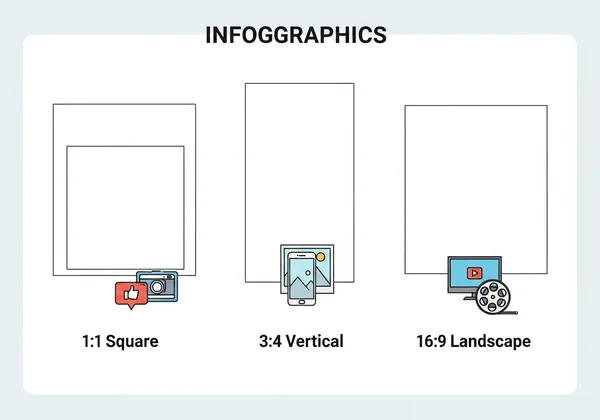
Square vs. Vertical: When to Use Each Ratio for Maximum Impact
- Square (1:1): This is the classic ratio for social media profile pictures and Instagram posts. It’s perfect for portraits and single-subject still life photos where the focus is centered. A square frame forces attention onto the main subject, creating a balanced and focused composition.
- Vertical (3:4 or 9:16): Vertical ratios are ideal for full-body portraits, tall buildings, or any subject that is taller than it is wide. The 9:16 ratio is perfect for Instagram Stories and TikTok videos. Use a vertical frame to emphasize height and create a dramatic, immersive feeling.
Landscape Ratios: Capturing the Full Scene
- Landscape (4:3 or 16:9): These wider ratios are the standard for landscape photos, cityscapes, and group shots. They allow you to capture a broad, panoramic view and create a sense of openness and scale. The 16:9 ratio is also the standard for desktop wallpapers and YouTube video thumbnails. Use this to showcase sprawling scenery and tell a bigger story within your frame.
Instagram-Perfect Dimensions: Optimizing for Social Media
Sharing your AI art is one of the best parts of the creative process. To make your work look its best on social media, choose the right aspect ratio from the start.
- For Instagram Posts: Use Square (1:1) for a classic look or Vertical (4:5) to take up more screen space in the feed.
- For Instagram Stories: Always choose Vertical (9:16) to fill the entire screen and create an engaging experience for your followers.
- For Profile Pictures: Square (1:1) is the universal standard across almost all social platforms.
Match your aspect ratio to your subject and intended platform. This ensures your AI-generated art has the professional quality it deserves. Your artwork will stand out in the digital space and attract attention with its thoughtful composition.
Quick-Start Workflow: From Upload to Download in Under 60 Seconds
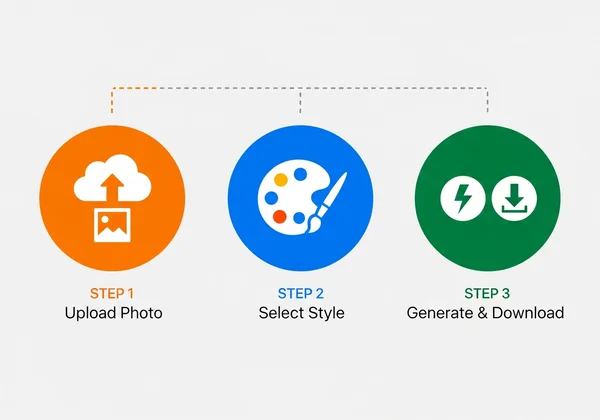
What makes AIDrawing.io remarkable is how it puts powerful AI art creation within everyone's reach—no technical skills required. You don't need to be a tech expert or professional artist to create incredible images. Here is a simple three-step workflow that takes you from your original photo to a downloadable masterpiece in less than a minute.
Step 1: Instant Photo Analysis
First, choose your image. You can upload a photo from your device or select one of the demo images to get started. Once you have your image, take a moment to analyze it using our guide above. Is it a portrait, a landscape, or an object? This quick analysis will guide your style choice. For example, if you upload a picture of your cat, you know that the Anime or Ghibli style could be a great fit.
Step 2: Style Selection Mastery
Now for the fun part. Navigate to the style library. Based on your photo analysis, select the style that best matches your subject. If you chose a photo of the New York skyline, click on the Cyberpunk style. If you uploaded a selfie, try the Anime or Watercolor style. Click on your desired style, choose your preferred aspect ratio, and you're ready for the final step. It's a simple, no-prompt process. This focus on visual selection is what makes our AI drawing tool so intuitive.
Step 3: One-Click Generation & Download
With your image uploaded and style selected, simply click the "Generate" button. The AI will get to work, transforming your photo based on your choices. In seconds, you’ll see a "Before & After" comparison. If you love the result, just click the "Download" button to save your new artwork to your device. It’s that fast and that easy. You can generate your first image in seconds.
Ready to Transform Your Images with AI Art?
You no longer have to waste time with trial and error. This guide has given you a clear and simple plan to create amazing AI art. By matching your photo type to a recommended style and choosing the right aspect ratio, you can consistently produce stunning results.
Here's what you need to remember:
- Match Your Subject: Pair portraits with styles like Anime, landscapes with Ghibli, and cityscapes with Cyberpunk for the best results.
- Frame it Right: Use square ratios for profiles, vertical for stories, and landscape for scenic views.
- Embrace Simplicity: The creative process should be fun, not frustrating. A tool that doesn't require complex prompts makes AI art accessible to everyone.
The world of AI drawing is at your fingertips, and it’s easier to explore than ever before. Stop wondering and start creating. Visit AIDrawing.io to upload your photo and transform it into a unique piece of art in less than a minute!
The Takeaway
Can AI draw from an image effectively for different styles?
Yes, absolutely. Modern AI, especially tools focused on image-to-image generation like AIDrawing.io, excels at this. The AI analyzes the content, colors, and composition of your source image and reinterprets it in the new style you select. The key is choosing a style that complements the original photo, as outlined in our guide.
What is the best AI tool to turn pictures into drawings without technical skills?
For users who want to create art without a steep learning curve, the best tools are those that don't require "prompt engineering." AIDrawing.io is designed specifically for this purpose. You don't need to write complex text descriptions. You simply upload your picture, click a style, and generate. This makes it an ideal photo to art converter for beginners, social media creators, and anyone who values speed and ease of use.
How do I create AI art without prompts when I'm not artistic?
You don't need to be an artist to have great ideas! The "no-prompt" approach is perfect for you. Start with a photo you love—it could be a pet, a vacation spot, or even your lunch. Then, use a tool like AIDrawing.io and think of the styles as creative filters. Experiment by applying different styles like Ghibli, Steampunk, or Watercolor to your photo. This process is about discovery and fun, allowing you to create something visually stunning without needing any traditional artistic skill.