
5 AI Art Limitations (Beyond Hands) Solved with Image-to-Image Style Transfer
The AI art revolution has opened doors for everyone. Today, you can create a masterpiece in seconds. Yet, many creators still hit walls that break the creative flow. You might have seen images with distorted text, messy patterns, or failed symmetry. If you have ever been disappointed by your results, you are not alone.
Most people focus on the famous "hand problem," where AI struggles to draw fingers correctly. But the challenges go much deeper than that. This article explores five common AI art limitations beyond just hands. More importantly, we will show you how a unique style-focused approach helps you bypass these issues. Discover our AI art generator today to see how easy it is to create stunning results without the typical headaches.
Understanding the Core Challenges in AI Art Generation
To fix a problem, we must first understand why it happens. AI art tools do not understand the "logic" of an object like a human artist does. A human knows a chair needs four legs for balance. In contrast, an AI only knows that "chair-like" pixels often appear near "leg-like" pixels.
Why AI Struggles with Specific Visual Logic
AI models are trained on billions of images. They are excellent at recognizing general patterns but often fail at specific logic. For example, an AI might recognize a face but forget that earrings should usually match. These "hallucinations" happen because of statistical prediction. Unlike humans, AI doesn’t grasp the physics of a scene—it predicts shapes statistically, which can lead to oddball errors like blurred details or floating objects.
The Fundamental Difference Between Text-to-Image and Image-to-Image AI Approaches
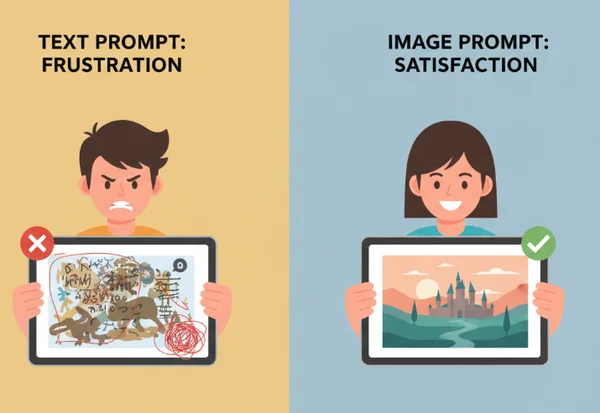
Most popular tools use "Text-to-Image" technology. You type a prompt, and the AI builds an image from nothing. This is where most errors occur because the AI has too much freedom to make mistakes.
In contrast, an "Image-to-Image" approach uses your uploaded photo as a structural map. Because the algorithm has a real-world reference to follow, it is much less likely to "hallucinate" strange shapes. This method preserves the "bones" of your image while applying a beautiful new artistic skin. Experiment with image-to-image style transfer to see this stability in action.
Common User Frustrations When Creating Digital Art with AI
Many creators feel frustrated when they spend hours writing complex prompts only to get a messy result. Common complaints include:
- Text in the background turning into "alien" symbols.
- Beautiful landscapes that look "melted" upon closer inspection.
- Losing the likeness of the original subject.
Using a reliable AI art generator can solve these frustrations. By focusing on style rather than pure invention, the process becomes much simpler.
Limitation #1 - Text Distortion and Illegibility in AI Art
One of the most immediate "tells" of an AI-generated image is the text. If your original photo has a street sign or a shop name, many AI tools will turn those letters into unreadable scribbles.
Why Most AI Tools Fail at Preserving Text in Images
Standard AI models do not "read" text. They see letters as simple shapes. When the AI tries to recreate these shapes, it often blends them together or adds extra loops. Since the AI doesn't understand that "COFFEE" is a word with a specific spelling, it might output gibberish.
How our Algorithm Preserves Text Elements Naturally
Our platform uses a specialized style transfer method. Instead of rebuilding the image from scratch, it layers the artistic style over your existing image. Because the underlying structure of your text remains intact, the AI is much better at keeping your words legible. It treats the text as a shape to be "painted" rather than a concept to be "re-invented." This makes our style transfer tool a favorite for creators who need to maintain clear visual messaging.
Real-World Examples: Preserving Clarity in Signage
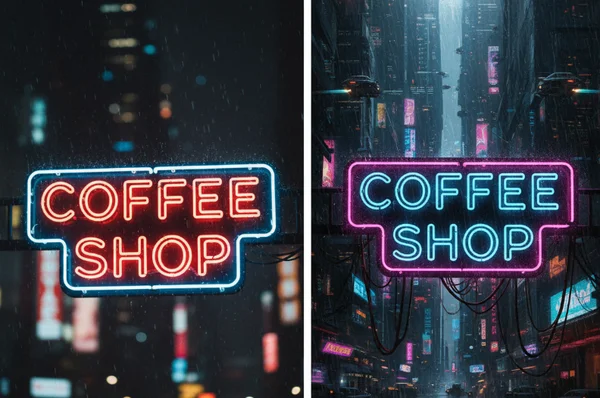
Imagine you upload a photo of a neon sign that says "Open."
-
Traditional Text-to-Image: Might change the sign to say "Opeee" or turn the letters into meaningless glowing lines.
-
Our Platform: Maintains the "O-P-E-N" structure but adds a gritty, Cyberpunk glow. The message stays clear, but the art style changes completely.
Limitation #2 - Symmetry and Pattern Failures
Symmetry is a sign of beauty and order, but it is difficult for many AI models to master. Whether it is the two sides of a human face or the repeating patterns on a floor, AI often gets "lost" in the details.
The AI Art Symmetry Problem Explained
AI generates images piece by piece. This fragmented approach often creates asymmetry—like misaligned eyes or uneven windows. In complex patterns, like a checkered floor, the AI might start the pattern correctly on the left but "forget" the spacing by the time it reaches the right.
Preserving Geometric Balance through Reference Images
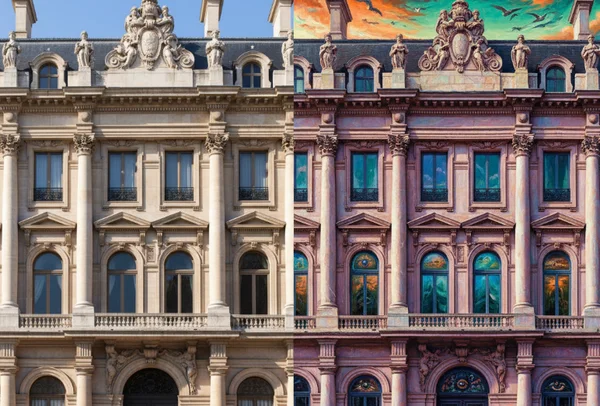
Because our tool works from your original image, you define the symmetry. If your original photo has a perfectly centered subject, the AI will respect those coordinates. It doesn't have to "guess" where the patterns should go because you have provided the blueprint. This is essential for architectural photography or portraits where balance is key.
Case Study: Creating Symmetrical Designs
Consider a designer working on a symmetrical logo. Using a prompt-based AI might result in "wiggly" lines that ruin the professional look. By uploading the clean design to our tool and choosing a "Surrealism" style, the designer gets a vibrant version that stays perfectly balanced.
Limitation #3 - Unpredictable Color and Lighting Inconsistencies
Have you ever generated an AI image where the light seems to come from three different directions at once? Poor lighting can make even the most detailed art look "fake."
How AI Often Compromises Color Accuracy
Many AI generators try to be too creative with light. They might add a bright sun but forget to add shadows on the ground. This creates a "flat" or "uncanny" feeling. Additionally, AI often over-saturates colors, making skin look too orange or grass look neon green.
The Advantage of Style Transfer for Maintaining Original Lighting
The core strength of our platform is its ability to recognize the "value" of your original photo. If your photo has a moody, dim light, the AI will keep that atmosphere while applying the new style. If you choose a "Ghibli" style, it will use a warm color palette but apply it to the specific light areas already present in your photo.
Preserving Mood and Atmosphere in Your Art
Atmosphere makes art feel emotional. By keeping your original lighting, we ensure the "soul" of your photo remains. A romantic sunset photo will still feel romantic after the transformation, rather than becoming a bright, clinical digital painting.
Limitation #4 - Detail Loss in Complex Images
When you turn a busy photo—like a city street or a dense forest—into art, many AI tools "smudge" the details. This is known as detail loss, and it can make your art look like a blurry mess.
Why AI Simplifies Complex Visual Information
AI models often have a "limit" on how much information they can process at once. To save computing power, they might simplify complex areas. A tree with a thousand leaves might become a green "cloud." While this looks okay from a distance, it loses the richness of the original scene.
How the Algorithm Maintains Important Details
Our algorithm is designed to be "detail-aware." It identifies the edges and textures that matter most. When you transform your photos, we fine-tune the output to ensure small details—like the texture of a brick wall—are stylized rather than deleted. This results in a high-quality artistic output that looks intentional.
Comparing Detail Preservation Across Different Methods
- Prompt-based AI: Often replaces complex backgrounds with generic "filler" textures.
- Our Style Transfer: Enhances the existing background. A complex forest becomes an enchanted woods, but the specific placement of the branches remains consistent with your original vision.
Limitation #5 - The Prompt Paradox and Creative Constraints
The "Prompt Paradox" is a simple truth: the more you try to control an AI with words, the more likely it is to fail. Writing the "perfect" prompt is a skill that takes months to learn. Even then, the results are unpredictable.
Why Text Prompts Often Limit Creative Freedom
For most people, describing a specific "vibe" in words is difficult. If you forget one word in your prompt, the AI might give you something completely different. This "trial and error" process is exhausting and often kills the creative spark.
The Image-to-Image Advantage: Visual Input as a Foundation
Images are a universal language. Instead of telling the AI what to do, you show it. By providing a visual foundation, you remove the guesswork. You don't need to be a "Prompt Engineer" to get great results. You provide the content, and we provide the style.
Unlocking Creative Possibilities Without Complex Prompts
No complex prompts needed. Whether you’re crafting Instagram posts or client concepts, our creative AI tool turns your photos into art in seconds. You are no longer limited by your vocabulary—only by your imagination. Explore styles like Steampunk, Watercolor, or Cyberpunk instantly.
Transform Your Photos with Confidence
AI art is evolving, but you don't have to wait for the future to get great results. By moving away from unpredictable text prompts and focusing on the structural integrity of your own images, you can bypass the most common limitations of digital art.
Whether you are worried about distorted text, broken symmetry, or losing fine details, the right tool makes all the difference. Our "Image-to-Image" technology ensures that your creativity stays in the driver's seat while we handle the artistic heavy lifting.
Imagine your sunset photos as Studio Ghibli paintings or cityscapes as Cyberpunk posters—it’s just one click away. Don't let technical limitations hold you back. start creating art today and discover how effortless professional-grade AI art can truly be.
The Takeaway
Why can't AI art preserve text accurately like other image elements?
Most AI models treat text as a visual pattern rather than symbols with meaning. Because the AI doesn't "know" how to spell, it recreates the look of text without the logic. Our tool solves this by using your original image as a guide. This ensures the text shapes remain recognizable throughout the style change.
How is this approach different from other AI art tools?
While many tools rely on "Text-to-Image," our platform focuses on "Image-to-Image." This keeps the original structure, symmetry, and text of your photo intact while applying a new artistic style. It is a much more controlled way to generate art. You can visit our site to experience this difference firsthand.
Will AI ever completely solve these limitations?
AI is improving every day. In the future, models will likely have a better "logical" understanding of the world. However, the "hallucination" problem is a core part of how generative AI works. Using an image-based reference will likely always be the most accurate way to maintain specific details and likeness.
Can I combine multiple styles to overcome specific AI limitations?
Currently, the best way to get a unique result is to try different styles on the same image. For example, if a "Cyberpunk" style feels too dark, you might try "Watercolor" for a softer look. Our platform allows you to quickly test different presets to find the one that best preserves your image's integrity.
What types of images work best for avoiding common AI art problems?
Images with clear lighting and a distinct subject work best. If your photo is very blurry or dark, the algorithm has a harder time "seeing" the structure. For the best results, start with a clean, well-lit photo and watch the transformation into a masterpiece!